
Introducing BluePrint
The intelligent SEC filing platform
From your Word draft to a completed SEC filing, with an AI filing assistant working alongside you.
BluePrint brings instant EDGARization from Word, AI financial printer typesetting, AI-assisted US GAAP Inline XBRL (iXBRL) tagging, EFM and DQC pre-filing validation, redline review and direct EDGAR submission into one AI SEC reporting and AI EDGAR filing workspace—across Forms 10-K, 10-Q, 8-K, registration statements, DEF 14A proxies, and structured XML ownership filings (Section 16, Form 144 and Schedule 13). Forms 3, 4 and 5 are always free; Form 144 and Schedules 13D/13G are free on every plan.
Filing Assistant
Your filing has an assistant.
General-purpose AI tools only know what you paste into them. BluePrint's Filing Assistant works directly with the filing in front of you.
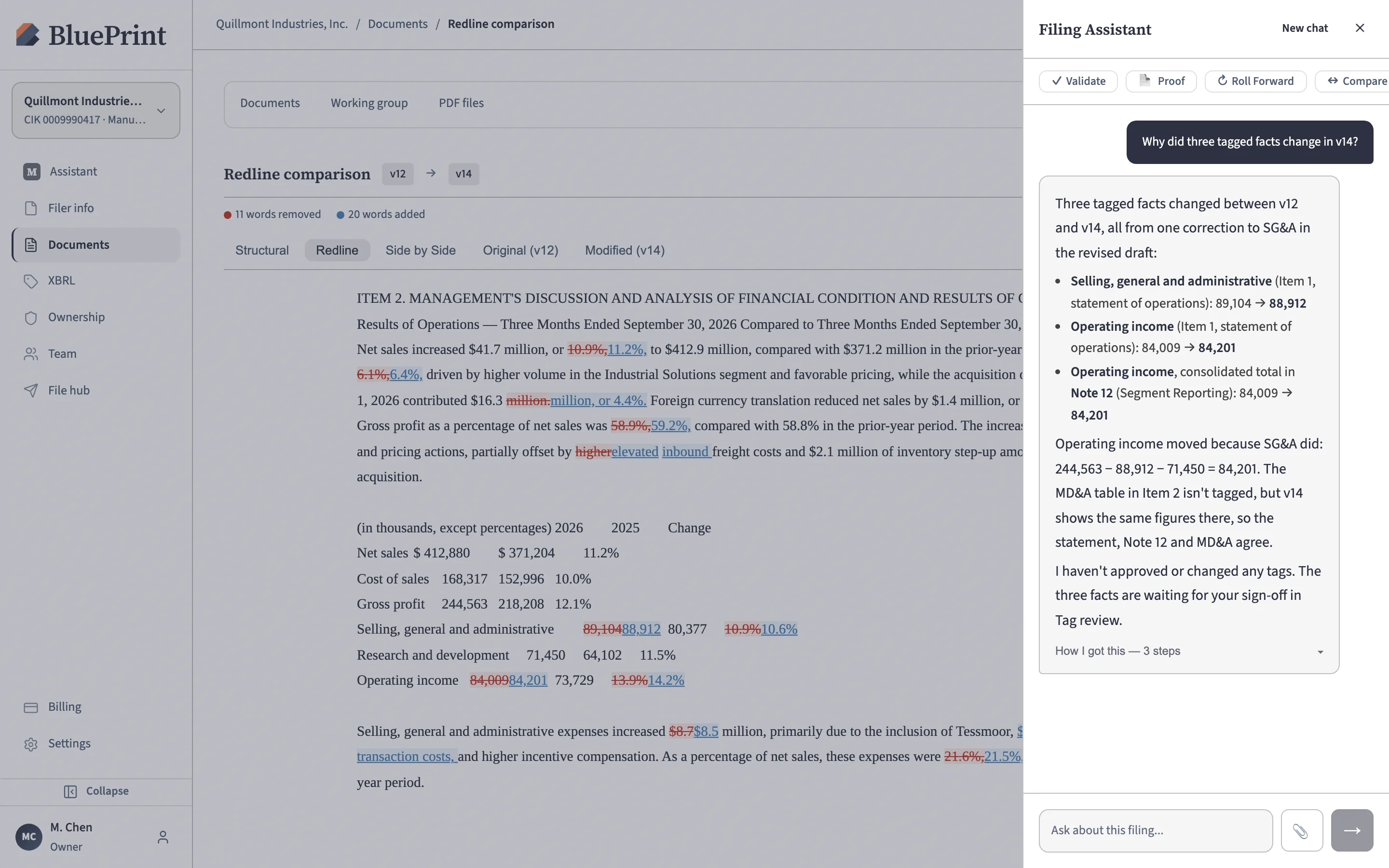
It understands your financial statements, footnotes, prior EDGAR filings, XBRL tags and validation status as one connected record. Ask why a concept was chosen, check whether numbers tie out between the statements and notes, resolve a validation warning, or have it prepare the next step at your direction.
The assistant never files or changes a tag on its own. Your team reviews its work and signs off on every tag before it enters the filing.
- "Why was this US GAAP concept selected for Note 4?"
- "Do the segment revenue totals in Note 12 tie out to the income statement?"
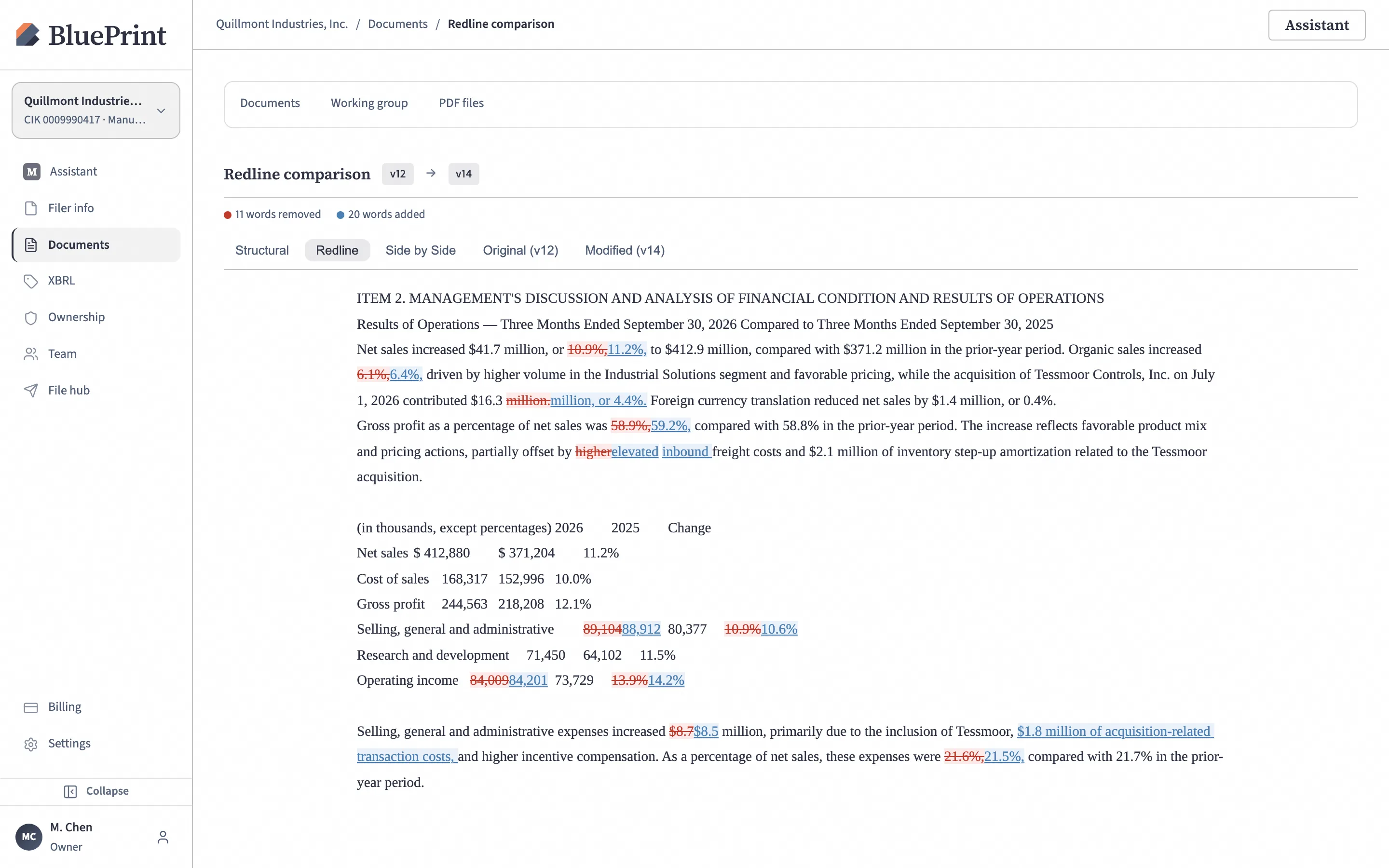
- "Which tagged numbers changed after we uploaded the revised Word draft?"
- "Are there any filing-blocking errors we must fix before test filing?"
- "Explain this validation warning and how to resolve it."
- "Show me everywhere this number appears in the filing."
One workflow
From Word draft to EDGAR
- 01
Start with Word — instant EDGARization
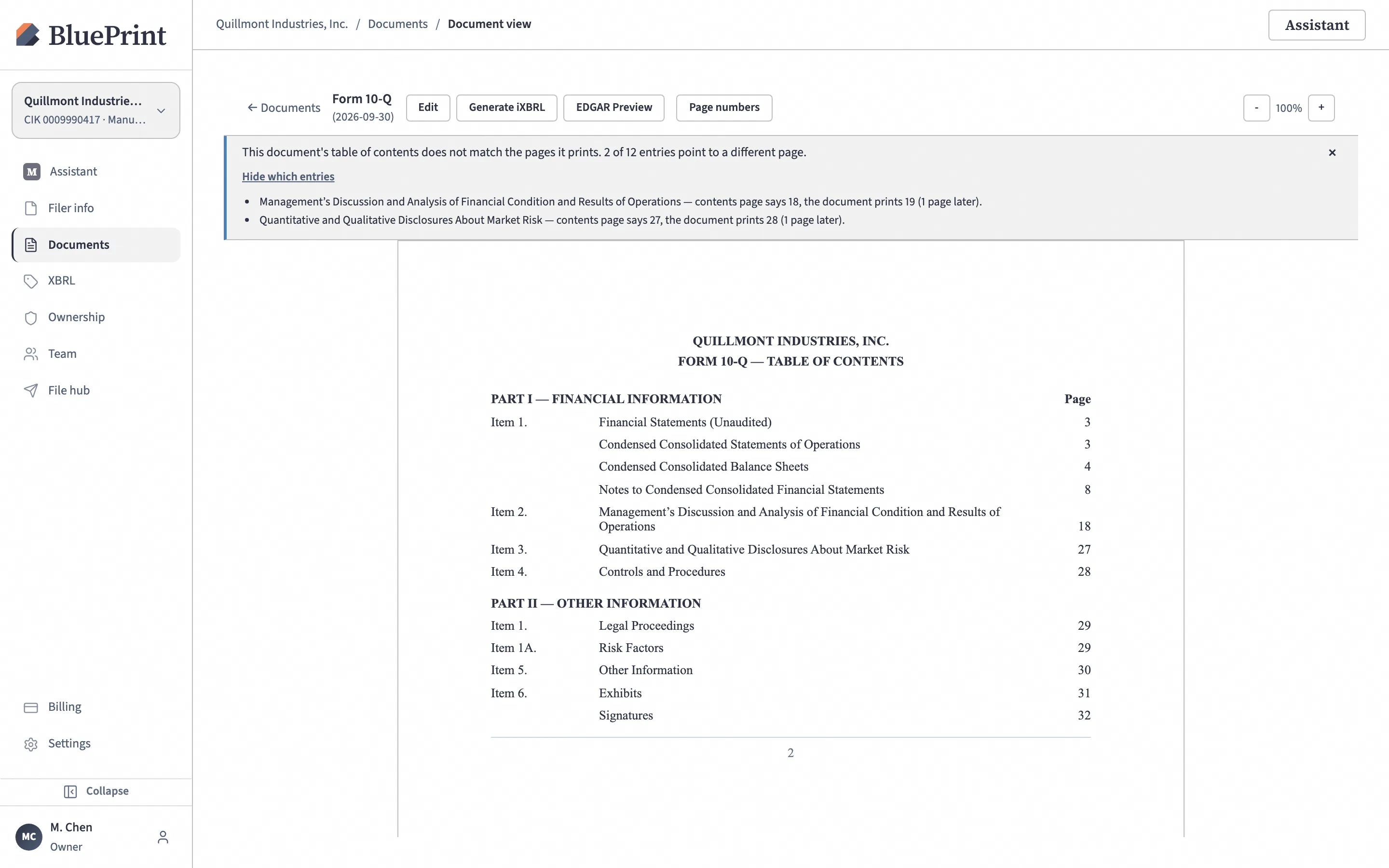
Upload the Word draft your team already prepares for fast, instant EDGARization. BluePrint converts it into a clean EDGAR HTML filing while keeping financial table alignment, double-underlines and page breaks intact, and checks that Table of Contents page numbers match the document.
- 02
Edit, re-upload and redline
Revise text and numbers directly in the workspace or upload an updated Word draft when late audit changes arrive. BluePrint saves every version automatically, compares any two versions as a word-by-word, side-by-side or structural redline, and keeps your existing tags in place.
- 03
Tag & roll forward with AI
BluePrint tags face financial statements, footnote tables and narrative disclosures (Levels 1 through 4), carries forward prior-period tags and company-specific custom concepts, and flags only new or revised disclosures for review.
- 04
Review & tie out in context
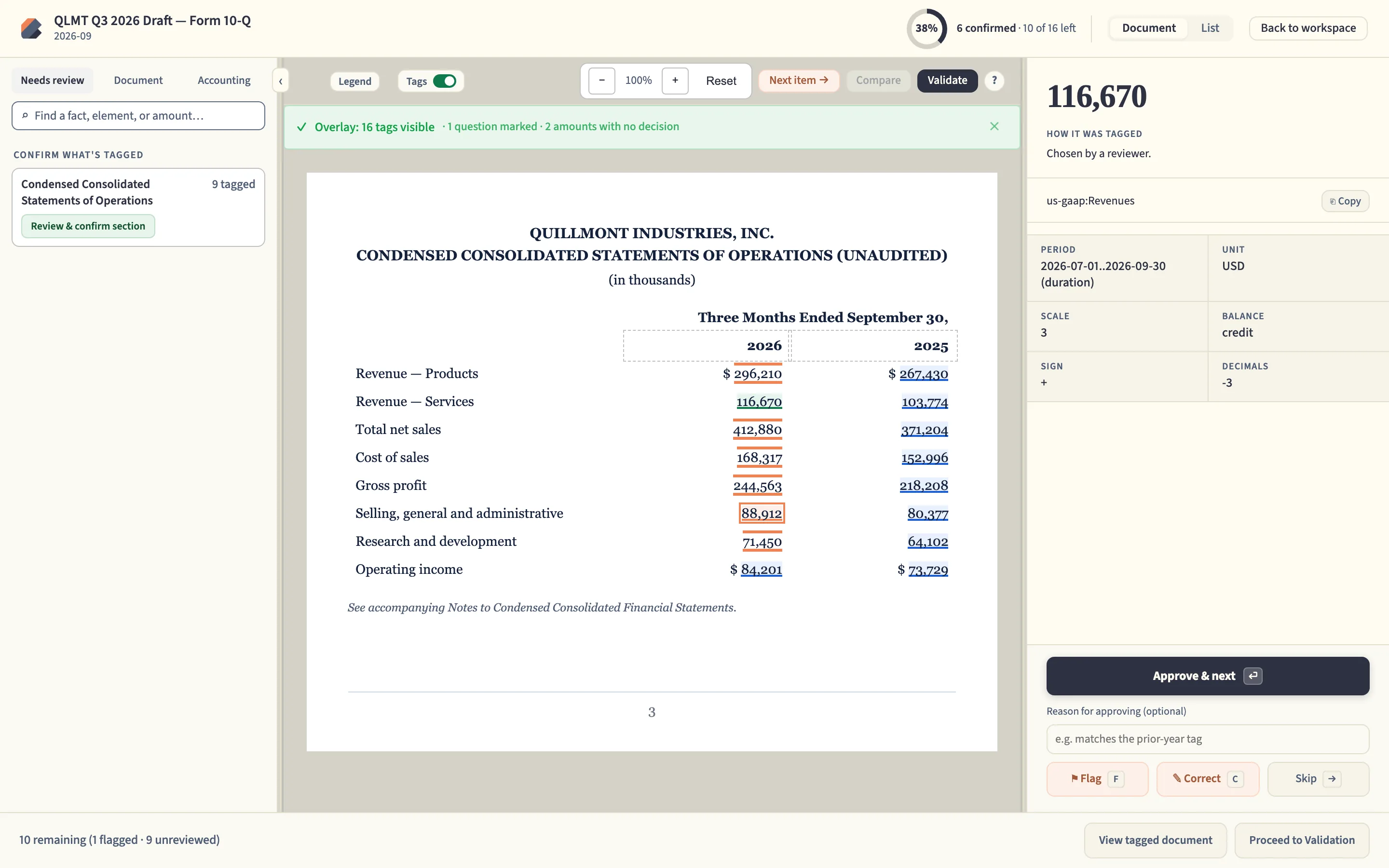
Every tag stays visibly linked to the line item or footnote it represents. Select any tagged number to verify its concept, period, scale and balance, confirm that shared figures tie out between the financial statements and footnotes, and approve, correct or flag each tag in sequence.
See the number.See the concept.Check the tie-out.Record sign-off. - 05
Validate & test file
Check the filing against the SEC's EDGAR Filer Manual (EFM) and XBRL US Data Quality Committee (DQC) rules—clearly separating filing-blocking errors from warnings—and run a one-click EDGAR test filing before going live.
- 06
Submit to EDGAR
Attach new exhibits or incorporate prior filings by reference, produce board-ready or typeset PDFs if needed, and transmit the completed filing directly to EDGAR under your own credentials.
Incremental adoption
Adopt at your own pace, alongside your existing process.
Reporting teams and counsel do not need to overhaul their filing calendar at once. BluePrint can be introduced for a single form family, evaluated on public EDGAR data first, or operated alongside your outside counsel and filing agents.
Start with a single filing laneStep-by-step
- Evaluate on public data first. Run a complimentary AI test-tagging and validation report on your most recent publicly filed 10-K before bringing any confidential draft into the workspace.
- Begin with ownership filings or Form 8-K. Use BluePrint for Forms 3, 4, 5 and 144 and Schedules 13D/13G (all free) or 8-K current reports while keeping your quarterly and annual process unchanged.
- Expand to 10-Q and 10-K when ready. Bring periodic reports onto the same workspace and quarter-over-quarter roll-forward workflow on your own schedule.
Built for your review controlsBluePrint
- Works with outside counsel and filing agents. Dedicated workspace roles let external counsel and filing agents draft, review redlines, or transmit on a filer's behalf under separate permissions.
- Human sign-off on every tag. AI proposes concepts in context, and every tag can be approved, corrected, or flagged by a reviewer with an optional note explaining the decision.
- Standard EDGAR package export at any stage. Download a complete, standard EDGAR submission package at any point for audit sign-off, archiving, or transmission through another agent.
Platform capabilities
Built for every stage of an SEC filing
Instant EDGARization & AI financial printer output
Keep drafting in Word or edit directly in BluePrint for fast EDGARization without waiting on traditional financial printer turnarounds, broken financial tables, shifted page numbers, or lost tags.
- Fast, clean Word-to-EDGAR conversion. Instant EDGARization preserves financial table alignment, indent levels, double-underlines, and page breaks required for SEC EDGAR submission.
- Table of contents & page-number check. Repaginates after edits and verifies that printed Table of Contents page numbers match actual document pages.
- Exhibit index & incorporation by reference. Attach new exhibits or pull prior exhibits from your company's past EDGAR filings with their original form, exhibit number, and filing date.
- AI financial printer PDFs & prospectus e-reds. Generate book-grade typeset PDFs for Annual Reports to Shareholders (ARS), board review packets, and preliminary prospectus "e-reds."
Full-depth iXBRL tagging with reviewer sign-off
AI handles the heavy lifting across statements and footnotes, while your accounting team stays in control of every tagging decision.
- Statements, footnotes & cover page. Covers face financial statements, footnote schedules, narrative disclosures across Levels 1 through 4, and cover-page facts.
- US GAAP & custom company concepts. Selects standard US GAAP concepts first and creates company-specific custom extensions when a disclosure is unique to your business.
- Quarter-over-quarter roll-forwards. Carries forward your prior period's approved tags and custom concepts automatically, highlighting only new or revised lines.
- Statement-to-footnote tie-out & review history. Cross-checks shared numbers between statements and notes and tracks how every fact was tagged, reviewed, or carried forward.
Catch filing-blocking issues before EDGAR does
Validate continuously while you draft and tag—so filing night isn't spent deciphering cryptic SEC suspension messages.
- SEC EDGAR Filer Manual & data quality checks. Checks every tagged number against EFM rules and DQC guidance, including reversed signs and totals that don't add up.
- Blocking errors vs. warnings. Clearly separates errors that would cause EDGAR to suspend the filing from non-blocking warnings and review notes.
- CIK & fee-exhibit verification. Cross-checks registrant name and CIK against SEC records and verifies filing-fee exhibits on registration statements.
- One-click EDGAR test filings. Submit a live test filing to EDGAR from the workspace at any time to confirm acceptance before final transmission.
Section 16, Rule 144 and Schedule 13 XML in one hub
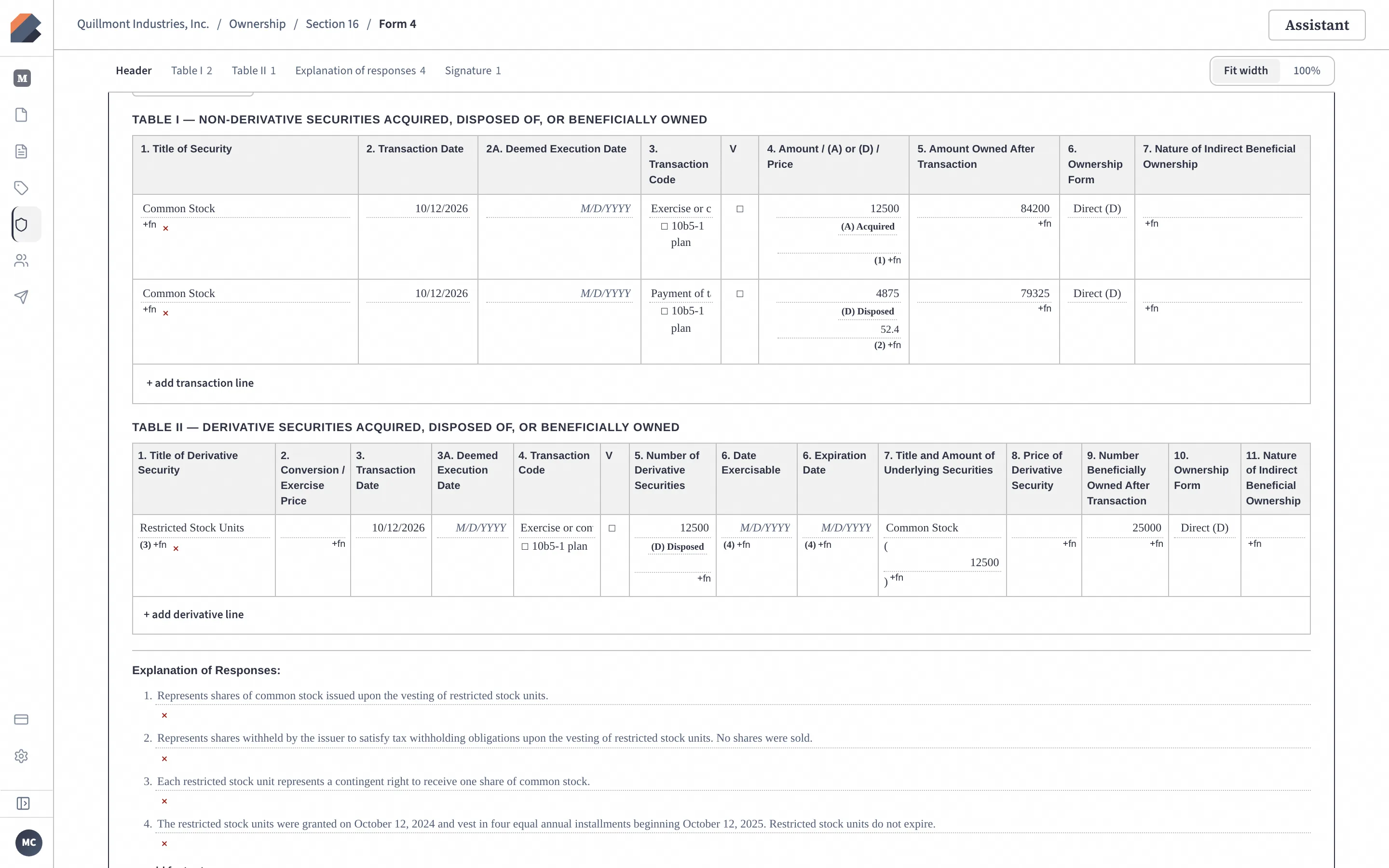
Purpose-built desks for corporate secretaries, in-house legal teams and outside counsel managing SEC-mandated structured XML insider and beneficial-ownership filings—free on every plan.
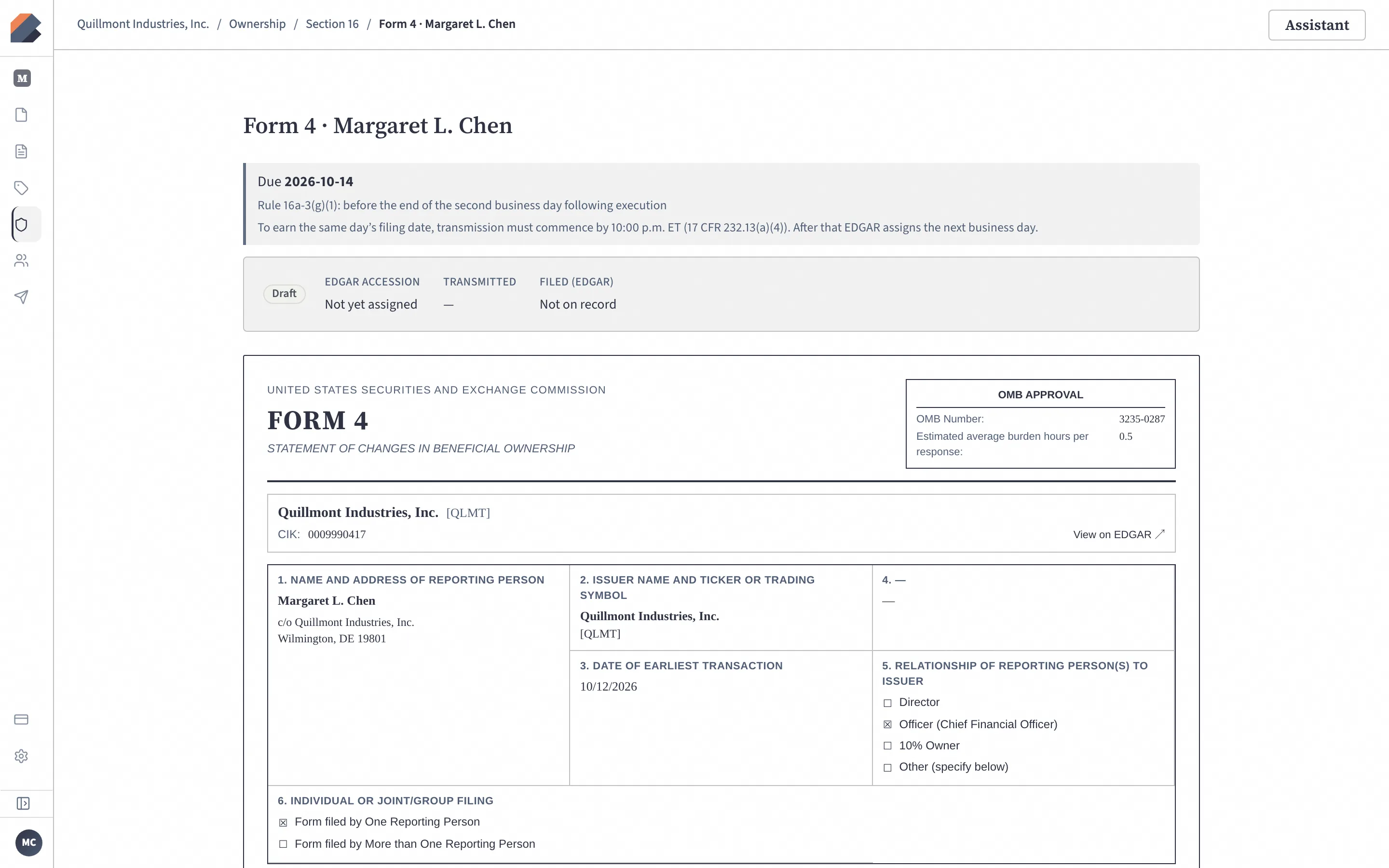
- Section 16 & electronic Form 144 XML desk. Prepare, validate and transmit Forms 3, 4, 5 and Form 144 in structured EDGAR XML, with filing deadlines tracked for every reporting person.
- Schedule 13D & 13G XML desk. Structured XML initial schedules and amendments (13D/A, 13G/A) for 5%+ beneficial owners, including joint filers, validated and transmitted directly to EDGAR.
- Short-swing screening & Item 405 support. Flags potential Section 16(b) short-swing matches for review and assembles the Item 405 list of late Section 16 reports for your 10-K and proxy.
- A profile for every reporting person. Holdings, recent transactions and filing history for each officer, director and holder, kept in one place.
Intelligent filing starts here.
BluePrint brings AI, document preparation, iXBRL, validation and SEC submission together in a single filing platform.
Prepare the filing. Understand the filing. Review the filing. Submit the filing.
Other questions? Talk to us.