
1. Which SEC forms support Produce e-Red vs. Convert to ARS
BluePrint’s row action menu (⋯) automatically displays the appropriate AI financial printer action based on the filing’s SEC form type:
| Row Action | Eligible Base Forms (including /A amendments) |
What BluePrint Produces |
|---|---|---|
| Produce e-Red | S-1, S-3, S-4, S-11, F-1, F-3, F-4 |
A typeset preliminary prospectus (“red herring”) PDF under PDF files › Typeset copies featuring the mandatory Item 501(b)(10) of Regulation S-K red legend along the cover spine, formatted prospectus summary, risk factors, and financial tables for investor distribution. |
| Convert to ARS | 10-K, 20-F, 40-F |
Dual output: 1. A book-grade typeset Annual Report to Shareholders PDF under PDF files › Typeset copies (Draft #1). 2. A linked child ARS document row under Documents › Working files that can be customized and transmitted to EDGAR as Form ARS. |
2. How to produce a preliminary prospectus e-Red
When preparing an initial public offering or follow-on shelf offering on Form S-1, S-3, S-11, or F-3, you can generate an electronic red herring prospectus (e-Red) directly from the working filing row.
Open the registration statement’s row menu (⋯) and click Produce e-Red
On the Documents page, locate your registration statement row (at Ready status) and click ⋯. Directly below PDF Proof, click Produce e-Red.
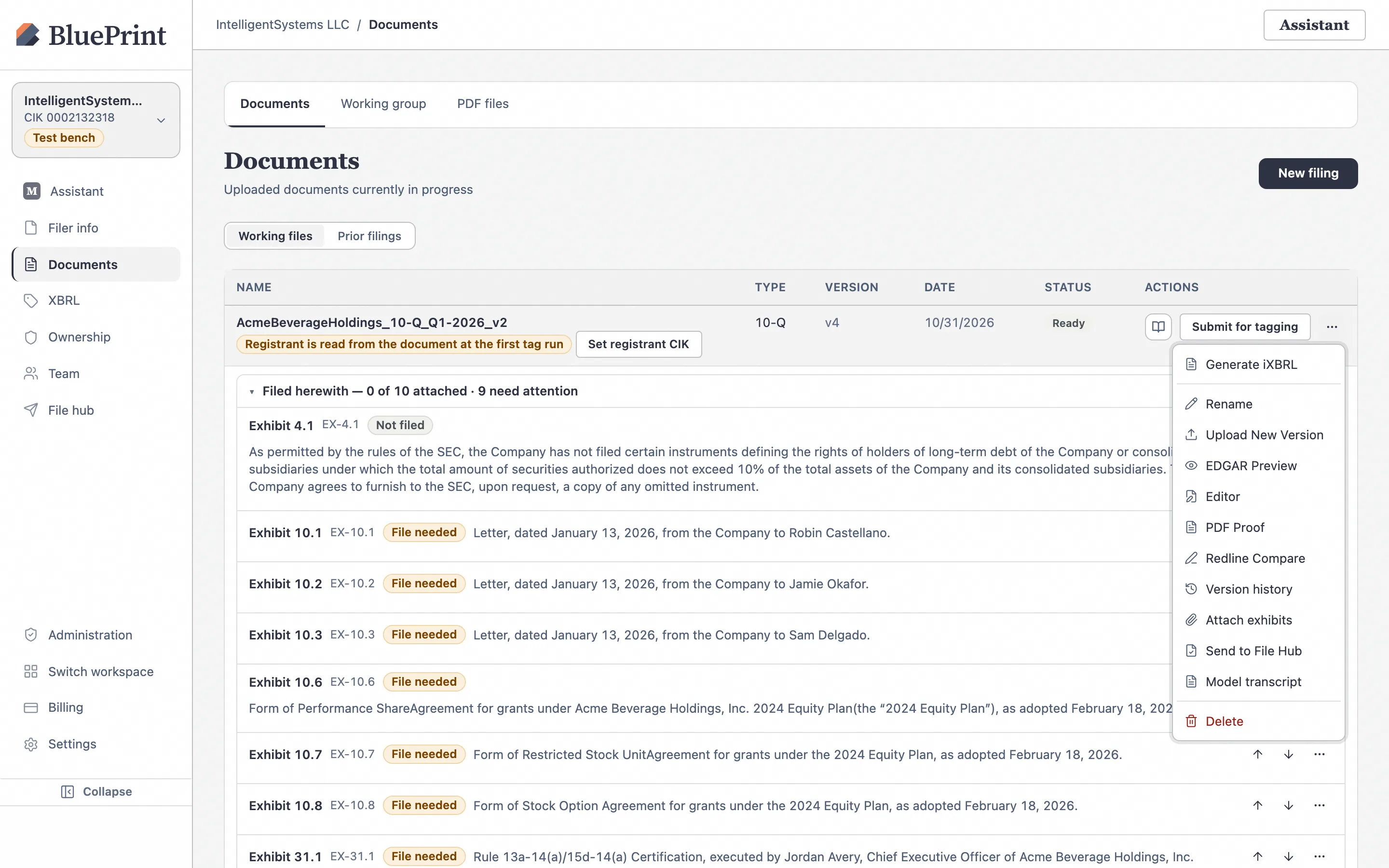
Inspect the e-Red in PDF files › Typeset copies
BluePrint queues the typeset job, displays a progress toast (“Typeset copy queued — track progress below”), and opens Documents › PDF files › Typeset copies (/documents/typeset?tab=typeset). Once the status badge changes from Generating… to Draft, click View to inspect the cover page red herring legend, typography, and table pagination, or click Download to distribute the e-Red PDF to underwriters and counsel.
3. How to convert a 10-K, 20-F, or 40-F into an Annual Report to Shareholders (ARS)
Under Exchange Act Rule 14a-3(b), companies must accompany or precede their annual meeting proxy statement with an Annual Report to Shareholders (often prepared as a “10-K wrap” or standalone glossy ARS) and submit it to the SEC on Form ARS under Rule 14a-3(c). BluePrint automates the conversion from your filed or ready Form 10-K, 20-F, or 40-F.
Click Convert to ARS on your 10-K, 20-F, or 40-F row
On the Documents page, click ⋯ on your 10-K, 20-F, or 40-F row and select Convert to ARS.
Understand the two synchronized artifacts created by Convert to ARS
When you click Convert to ARS, BluePrint performs two operations in parallel and displays the toast “ARS created under Working Files; typeset PDF queued”:
- A child ARS document row in Documents › Working files: Linked to your parent 10-K (`parent_id`), with form type ARS. You can open this ARS document in the Document Editor to add a shareholder letter, board roster, or performance graph narrative without altering your underlying 10-K.
- A numbered Draft #1 in Documents › PDF files › Typeset copies: A book-grade typeset PDF rendering of the Annual Report to Shareholders.
4. Inspect, re-run & download your typeset PDF drafts
Every time you run Convert to ARS or Produce e-Red after editing the document, BluePrint appends a new numbered run (Draft #2, Draft #3, etc.) under that source filing’s group in PDF files › Typeset copies rather than overwriting earlier drafts.
- Click View on any draft row to open the split-screen PDF viewer right inside BluePrint.
- Click Download to download the typeset PDF for shareholder portal hosting or print distribution.
- When your team signs off on the final ARS PDF and is ready to file Form ARS with the SEC, follow Guide 07: How to Submit a Created ARS to EDGAR.