
1. What EDGAR keys are required for submitting a filing?
Under the SEC’s EDGAR Next rules (Rule 10 of Regulation S-T and the EDGAR Filer Manual), every API transmission to EDGAR authenticates both the filing entity (or delegated filing agent) and the specific human user clicking Submit. Here are the five credentials and identifiers used across SEC filings and what each one does:
| EDGAR Key / Credential | Format & Lifespan | Who Owns It | When It Is Required |
|---|---|---|---|
| 1. CIK (Central Index Key) |
10-digit number (e.g., 0002132318)Permanent |
Every SEC registrant, Section 16 insider, and Schedule 13 reporting person has their own unique CIK. | Always required. Identifies the issuer and/or reporting person on every EDGAR submission. |
| 2. CCC (CIK Confirmation Code) |
8 characters, case-sensitive (must contain at least one digit 0–9 and one special character @ # $ *)Does not expire unless reset |
Belongs to the CIK whose filing is being made (the company’s CCC on corporate filings; the insider’s CCC on Section 16 filings; the lead filer’s CCC on Schedule 13). | Required on all filings to confirm authorization to file under that CIK. |
| 3. Filer API Token (Company / Agent Token) |
Encrypted JWT / API token generated on the EDGAR Filer Management dashboard Valid for 1 year |
Belongs to the entity transmitting the filing (either the company’s own EDGAR account or a delegated Filing Party’s EDGAR account). | Required for all test and live API submissions to authenticate the transmitting EDGAR account. |
| 4. User API Token (Personal Token) |
Encrypted JWT / API token generated on the EDGAR Filer Management dashboard Valid for 30 days |
Belongs personally to the individual human user who clicks Submit (tied to that person’s Login.gov identity). Never shared across teammates. | Required for the person pressing Submit on any test or live EDGAR transmission, or when clicking Check with EDGAR. |
| 5. Power of Attorney (POA) (Exhibit 24 / Written Authorization) |
Signed authorization document (EX-24) |
Granted by a Section 16 officer, director, or 10% owner to the company’s corporate secretary or counsel signing Form 3, 4, or 5 on their behalf. | Required for Section 16 filings signed by an attorney-in-fact on behalf of the reporting person. |
2. Required keys by filing lane (Corporate vs. Section 16 vs. Schedule 13)
Depending on which filing you are transmitting, two CIKs may be involved (for example, the Issuer vs. the Insider on a Form 4). Use this quick-reference matrix to check whose CIK and CCC are needed:
| Filing Lane & Forms | Whose CIK & CCC go in the submission? | Whose API Tokens transmit the filing? |
|---|---|---|
| Corporate Filings 10-K, 10-Q, 8-K, 6-K, 20-F, 40-F, ARS, S-1, S-3, 424B, DEF 14A |
Company CIK + Company CCC | Workspace Filer API Token (1-year) + Submitter’s personal User API Token (30-day). |
| Section 16 Insider Filings Form 3, Form 4, Form 5 |
Issuer CIK (company ticker/CIK) + Reporting Person’s own CIK & Reporting Person’s own CCC (plus POA on file if signed by attorney-in-fact) | Workspace Filer API Token (1-year) + Submitter’s personal User API Token (30-day). |
| Rule 144 Affiliate Sales Form 144 |
Reporting Person’s CIK & CCC (the affiliate selling securities) + Issuer CIK | Workspace Filer API Token (1-year) + Submitter’s personal User API Token (30-day). |
| Beneficial Ownership Schedule 13D, Schedule 13G (+ /A) |
Lead Filer (Reporting Person) CIK & CCC + Subject Company (Issuer) CIK | Workspace Filer API Token (1-year) + Submitter’s personal User API Token (30-day). |
3. How to obtain EDGAR credentials via SEC Form ID (Step-by-Step)
If a company, new director/officer, or 5%+ investor does not yet have a 10-digit EDGAR CIK, they must apply for EDGAR access by submitting an electronic Form ID through the SEC’s EDGAR Filer Management portal.
Create a personal Login.gov account with Multi-Factor Authentication (MFA)
Every individual who will act as an Account Administrator, User, or Technical Administrator on EDGAR must have an individual account at https://secure.login.gov using their business email address and an MFA method (such as an authenticator app or security key).
Check whether the applicant already has a CIK
Before submitting a new Form ID, search the SEC’s EDGAR Company & Person Lookup (`https://www.sec.gov/edgar/searchedgar/companysearch`). Many directors and executive officers already have an individual CIK from service at another public company. Duplicate Form ID applications for a person or entity that already has a CIK will be rejected by the SEC.
Complete the online Form ID application on EDGAR Filer Management
Sign in at https://www.filermanagement.edgarfiling.sec.gov with Login.gov and choose Apply for EDGAR Access (New):
- Applicant Type: Select Filer (Company) for an issuer/entity or Individual for a Section 16 officer, director, or individual beneficial owner. (Every Section 16 insider must apply as an Individual, not a company.)
- Applicant Details: Enter the legal name, tax identification number (EIN for companies; SSN is not required for individuals), business address, and telephone number.
- Account Administrators: Under EDGAR Next, corporate/entity applicants must designate at least two (2) Account Administrators (unless a single-member company); individual insiders and single-member entities need at least one (1) Account Administrator.
Sign, notarize, and upload the Form ID authentication document
Before transmitting Form ID, print the completed Form ID signature page:
- Have an authorized officer of the company (or the individual insider, or an attorney-in-fact holding a valid written Power of Attorney) sign the Form ID in the presence of a notary public (remote online notarization is accepted where valid under state law).
- Ensure the notary seal, signature, commission state, and commission expiration date are clearly legible.
- Scan the notarized Form ID (plus the signed Power of Attorney if an attorney-in-fact signed on an individual’s behalf) as a PDF, attach it to the electronic Form ID submission, and submit.
Activate the EDGAR account and set your 8-character CCC
When the SEC approves your Form ID, you receive an email containing your new 10-digit CIK. Sign back in to the EDGAR Filer Management dashboard (filermanagement.edgarfiling.sec.gov) with Login.gov to view your filer account and copy or set your 8-character CCC (CIK Confirmation Code).
4. How to generate your Filer API Token & User API Token on EDGAR
To allow BluePrint to check credentials or submit test/live filings to EDGAR’s APIs, you generate two tokens on the SEC’s EDGAR Filer Management dashboard:
Generate the 1-year Filer API Token
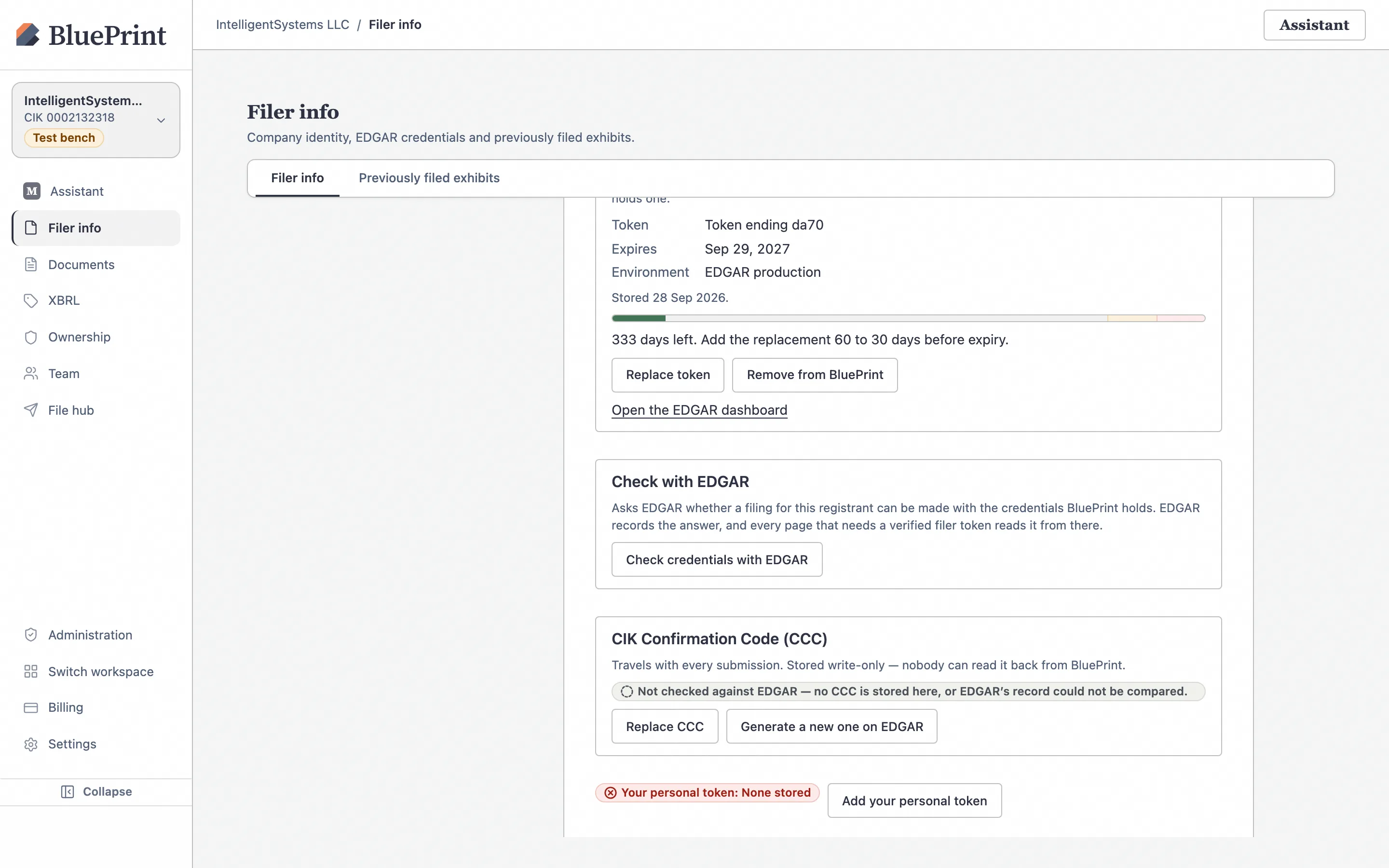
In the EDGAR Filer Management dashboard, open the filer’s account (as an Account Administrator or Technical Administrator), navigate to the API Tokens / Filer API Tokens section, and generate a new Filer API Token. Copy the token string immediately (EDGAR shows the full token only once at creation). It remains valid for 1 year.
Generate your personal 30-day User API Token
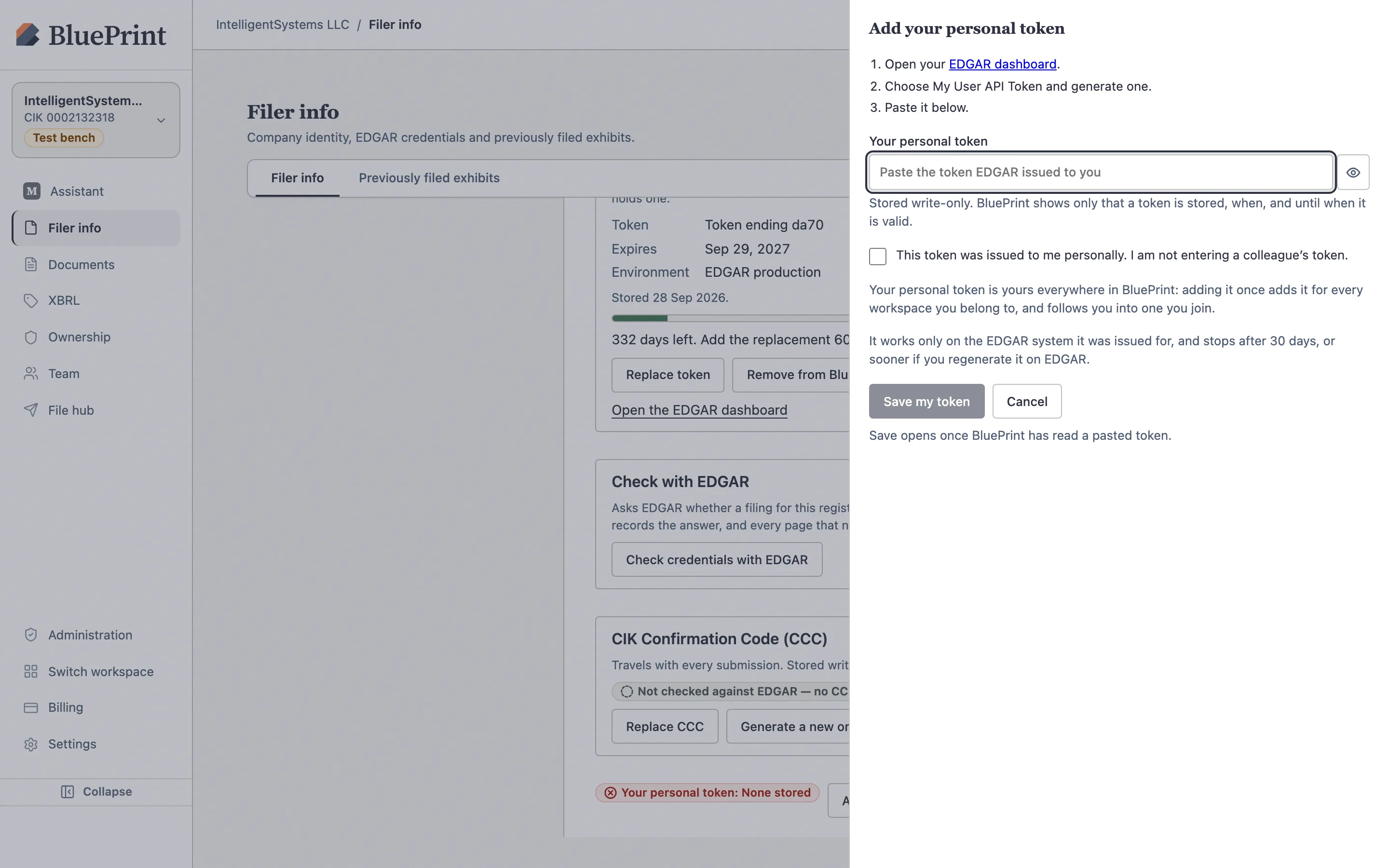
In the EDGAR Filer Management dashboard, open your personal user profile, navigate to User API Tokens, and generate a new User API Token. Copy the token string immediately. It remains valid for 30 days and belongs strictly to you as the individual user.
5. Where each key is entered in BluePrint
Once you have your EDGAR credentials, BluePrint stores each key in a dedicated, encrypted location:
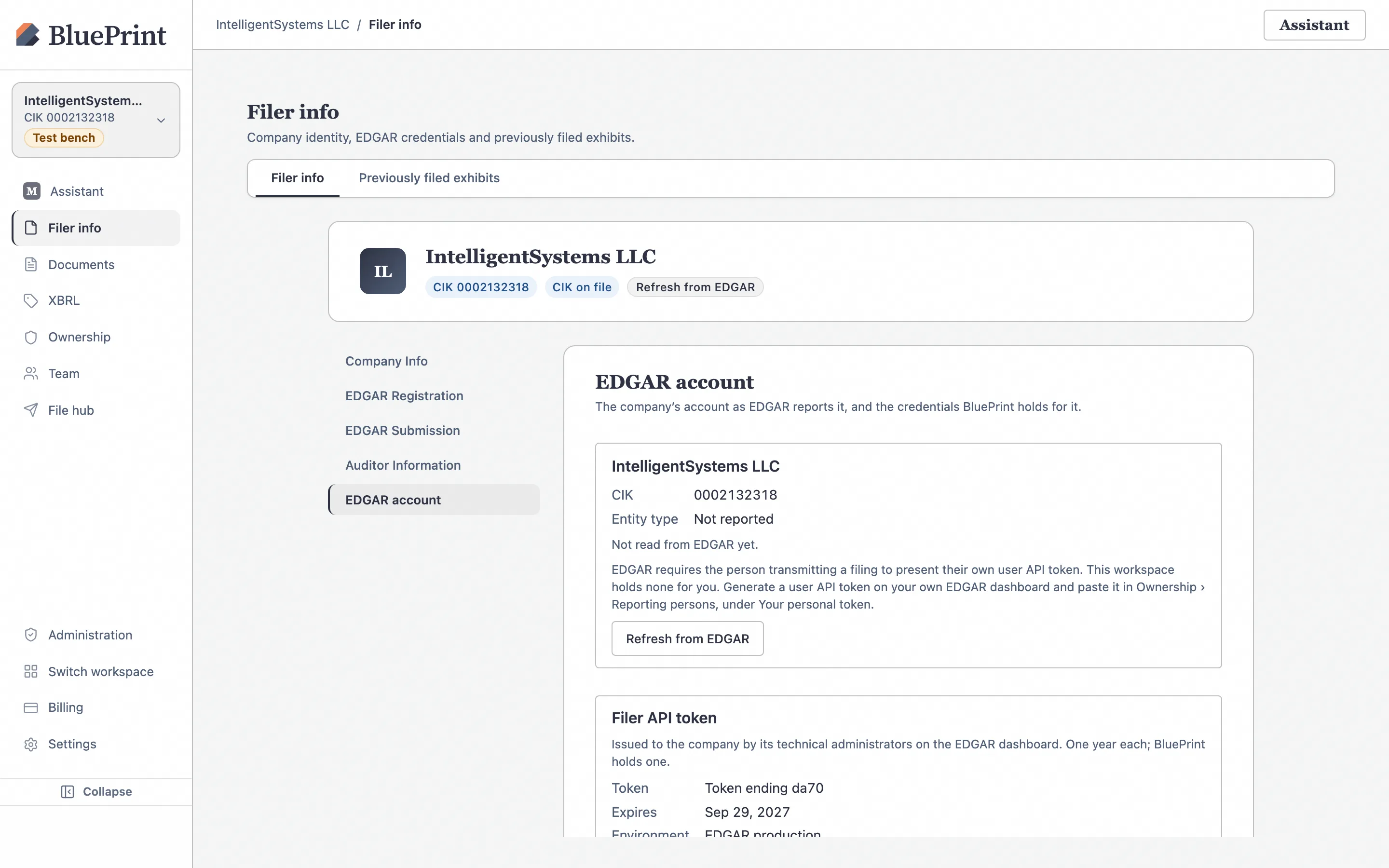
- Company Filer API Token (1-year) & Company CCC (8 chars): Saved once for the workspace under Filer info › EDGAR account (
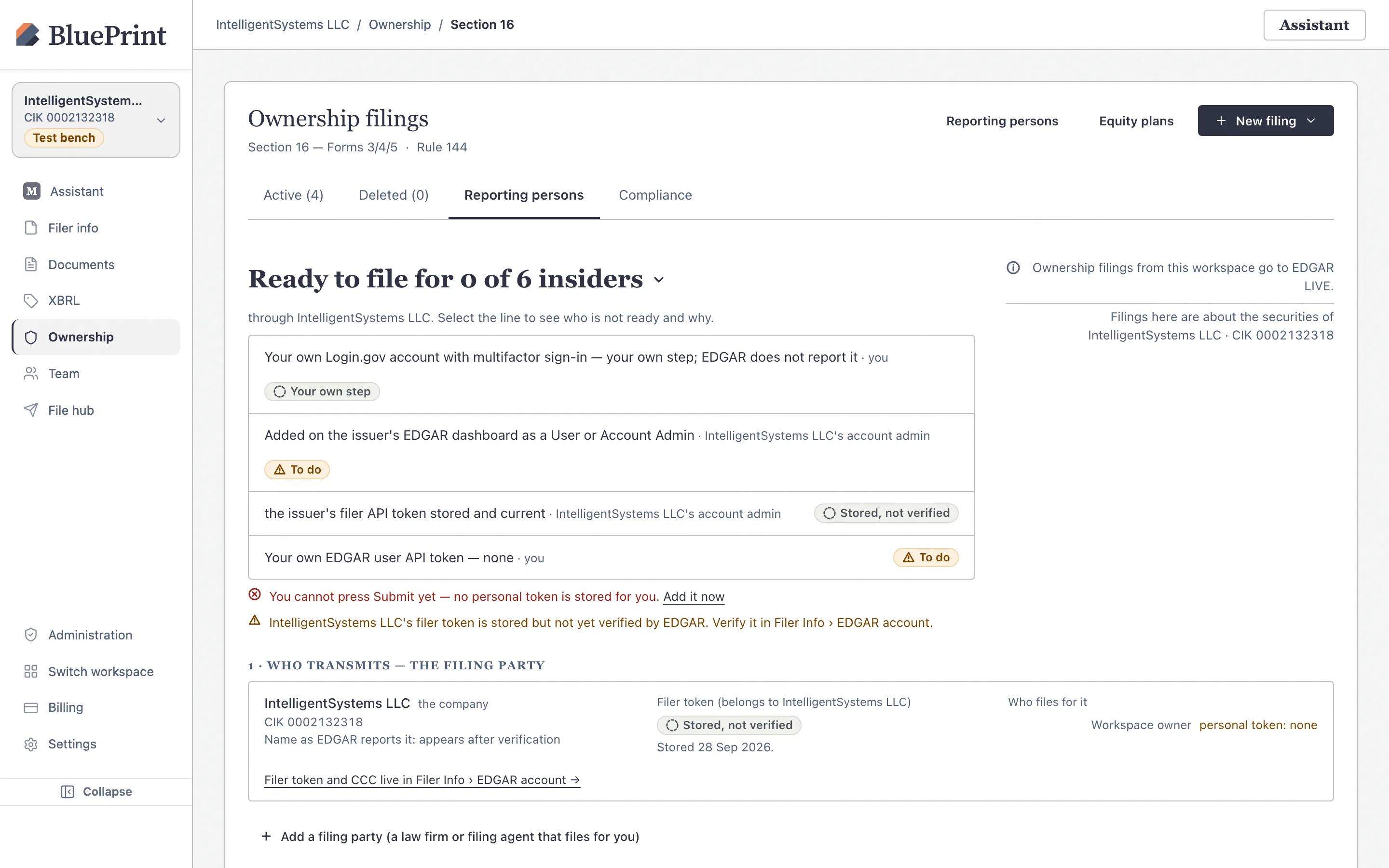
/filings?section=edgar-account). - Your Personal User API Token (30-day): Saved in your personal token drawer via Add your personal token on either Filer info › EDGAR account or Ownership › Reporting persons.
- Section 16 Reporting Person CIK, CCC & POA: Saved on each insider’s profile under Ownership › Section 16 › Reporting persons (
/ownership/section16/reporters).
Continue to Guide 10: How to Save & Verify EDGAR Credentials in BluePrint for the complete step-by-step walkthrough.